How to Put Your Restaurant Menu Online With BBSide
Put your restaurant menu online with BBSide. Share one link with guests and keep dishes, prices and allergens up to date as your menu changes.
A guest wants to see what’s for dinner before they book. Another wants to know whether there’s anything vegetarian. With a BBSide menu, both can find their answers on the same restaurant page. They can browse by course, look at the dishes and request a table while they’re there.
Give each menu a place on your restaurant page
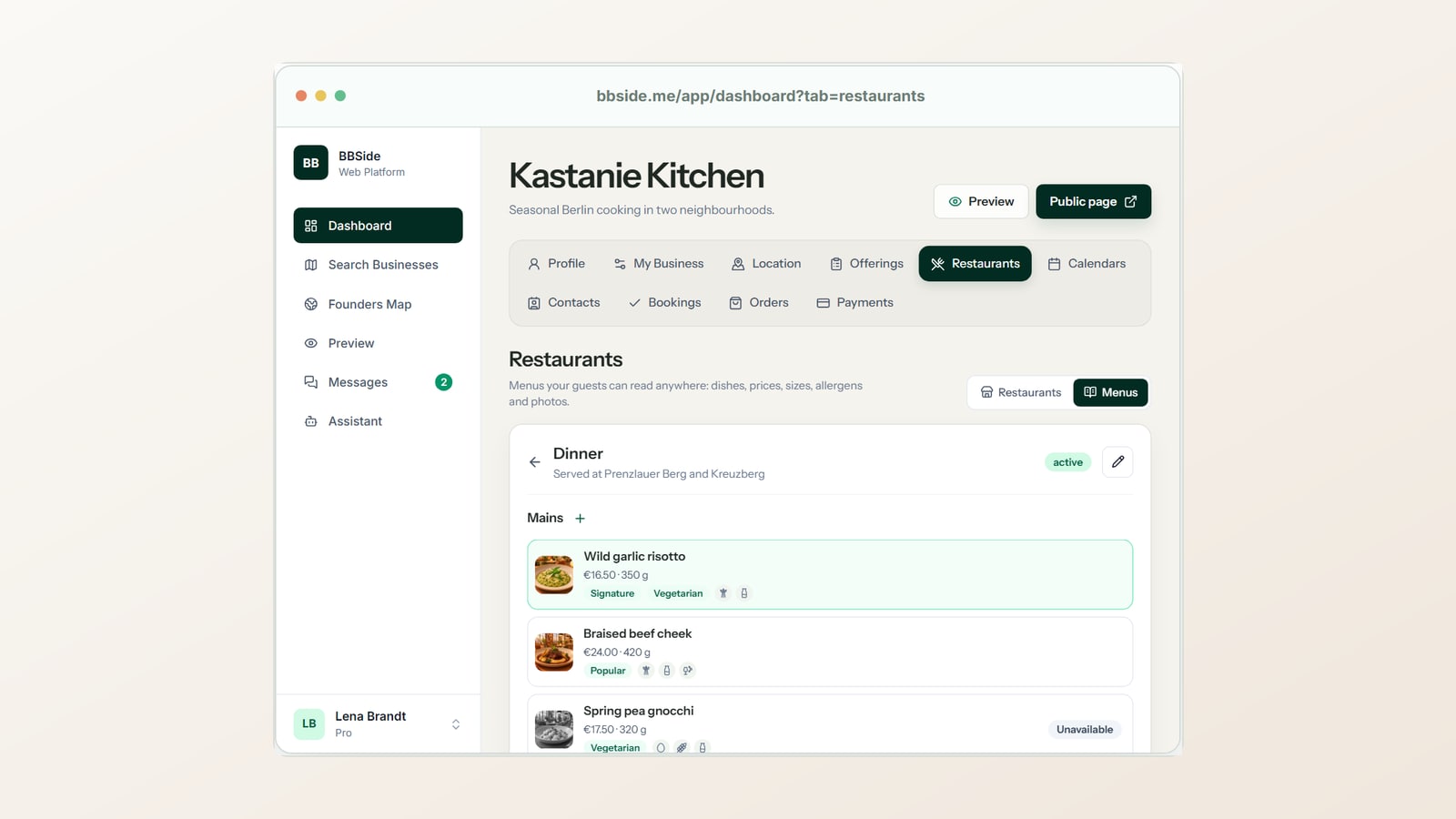
Start with the menu people ask for most. Kastanie Kitchen, our demo restaurant, has a Dinner menu with starters and mains, plus a separate Drinks menu. A guest looking for something to share can go straight to the starters. Someone deciding where to go for a drink can open the drinks list first.
Set up the groups your guests already use. A café might start with Breakfast, Pastries and Coffee. If you serve brunch on Sundays, give it its own menu and put the service hours in the description. You can attach that menu to just the location that serves it.
Show guests what they’re choosing
Kastanie Kitchen’s wild garlic risotto is €16.50 for a 350 g portion. Add a photo, the main ingredients and the relevant allergens to the dish. For the house lemonade, you can show 300 ml at €4 and 500 ml at €5.50 on one menu item, with a label for each size.
Guests can filter for dietary choices such as vegetarian or vegan and exclude allergens you’ve listed. That helps a group see what everyone could order before deciding where to eat. Keep those details in sync with the kitchen, especially when an ingredient changes, and make it easy for guests to ask your team about preparation.
Share the menu once and keep it current
Copy the direct link to your dinner menu and put it on your website or in your social profile. When someone asks what’s on tonight, send the same link in a reply. You can still print a menu for the tables. The link gives people a current copy they can read on their phones before visiting.
If the gnocchi sells out, mark it unavailable. When the kitchen brings it back, switch it on again. If the price changes, edit the item and keep the link you’ve already shared.
Let a diner go from the menu to a table
Put your menu alongside opening hours, location details and table reservations. A guest who’s just decided they want the risotto can choose a time on the same restaurant page and leave a request for your team.